How to build an online store for your craft business, step by step
Ready to start? Create your online shop in minutes, with no technical skills.
You make things, you sell at markets or from your workshop, and now you want to sell online too. This tutorial takes you from preparation to your first order in 8 steps, with real screens from the 123Ventes dashboard. Allow one day to open with around ten products.
Before you start, download the printable checklist (PDF, 1 page): it lists everything you need to have at hand and lets you tick off each step. Want to know the full cost first? Read how much an online store really costs.
What to prepare before you build the store
- A registered business (in France, for example, a micro-entreprise with its SIRET number): it will appear in your legal notice.
- A bank account to receive payments, ideally one dedicated to the business.
- Your 10 to 20 best products, not the whole catalog: you will add the rest later.
- 3 to 5 photos per product, taken in natural light on a plain background, including one that shows the size (in a hand, on a table, worn).
- The packed weight of each product, to work out shipping costs.
- A short introduction: who you are, what you make, where your workshop is.
Step 1: create the store (2 minutes)
On 123Ventes, signing up takes about 2 minutes, and the store is created straight away, with a catalog, a cart, customer accounts and information pages already in place. You set it up at your own pace, with no time limit, and you only choose your plan when you publish it.
Step 2: give it the look of your workshop (30 minutes)
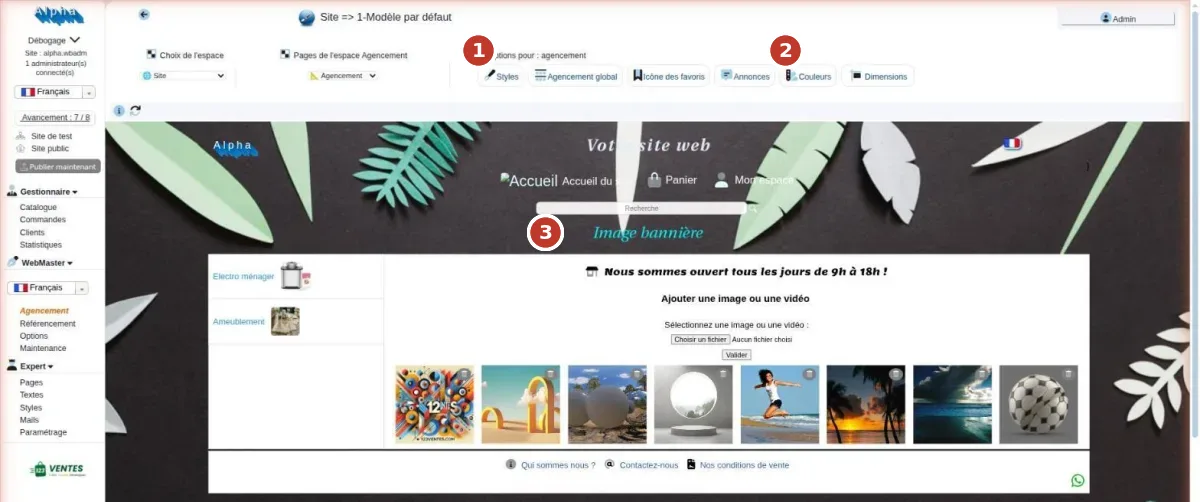
In Layout, add your logo, pick two or three colors and use a photo of your workshop or a signature piece as the banner. For a craftsperson, a real photo beats a stock image: customers want to see your hands, your tools, your materials. Then write the “About us” page with your introduction.
Step 3: add your products (1 to 2 hours)
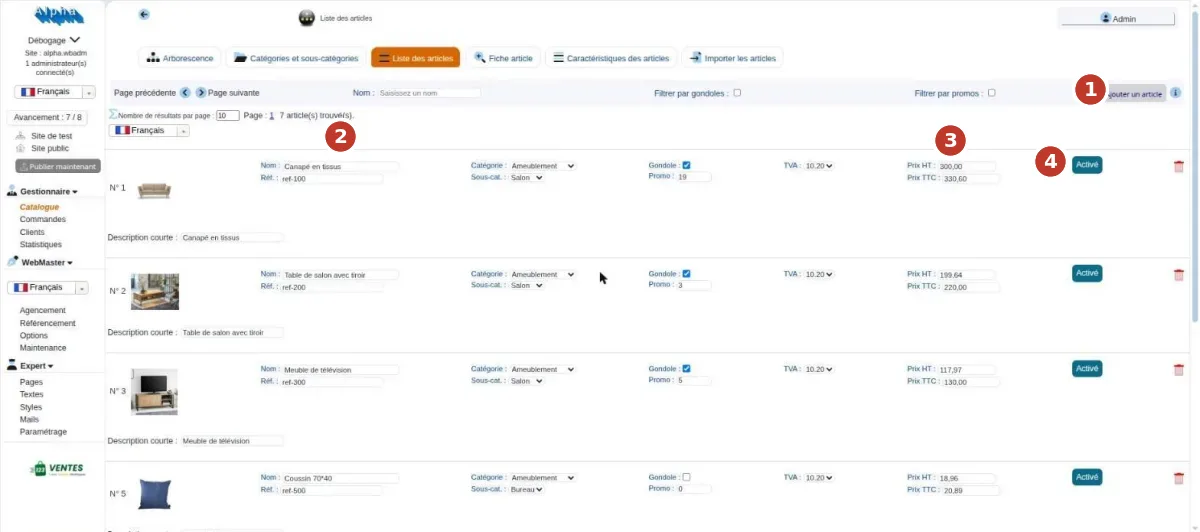
Start by creating your categories (for example: bowls, vases, one-of-a-kind pieces), then add each product with its photos, description and price. A few settings that matter for makers:
- One-of-a-kind piece: set the stock to 1. The product leaves the shop as soon as it is ordered, so you never sell the same vase twice.
- Small batch: enter the actual number of pieces available and the making time in the description.
- Made to order: offer options (size, color, engraving), or send a quote from the dashboard for special requests.
- Description: material, dimensions, weight, care, and what makes the piece unique. These details reassure buyers and help Google understand the page.
Already have your catalog in a spreadsheet? It can be imported in one go as a CSV file.
Step 4: connect payments (30 minutes)
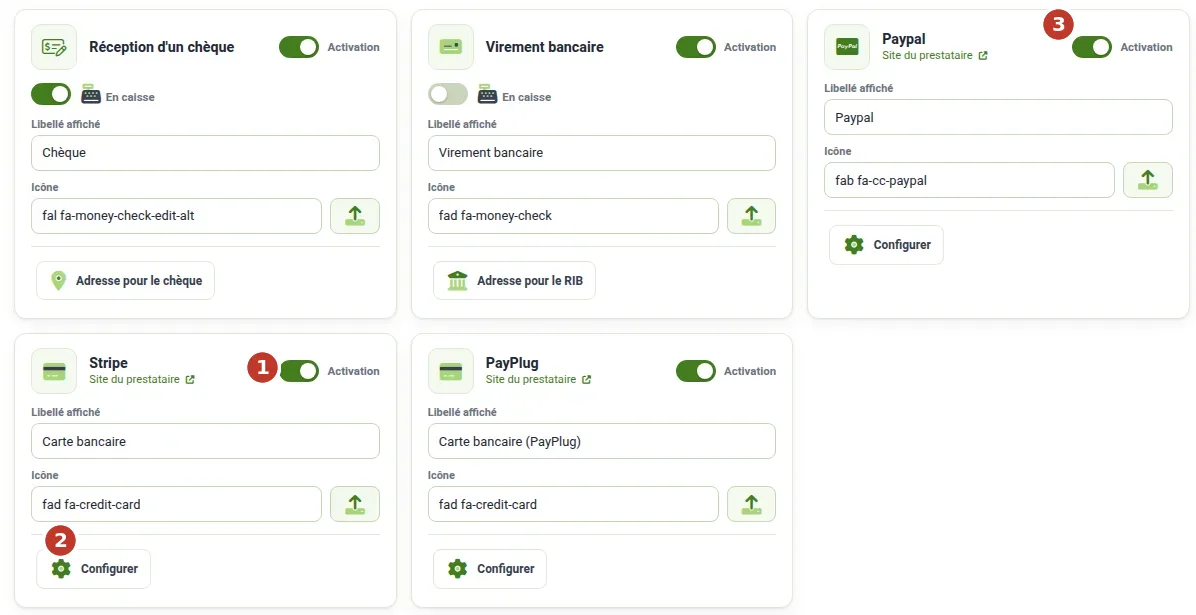
Card payments go through a provider, Stripe or PayPlug, and PayPal can be added alongside. Open your account with the provider (ID and bank details required), then paste your keys under Configure. Cheque and bank transfer are switched on with a simple toggle, which is handy for made-to-order pieces with a deposit.
The money from your sales goes straight to your account with your provider: 123Ventes takes no commission along the way.
Step 5: choose shipping and workshop pickup (30 minutes)
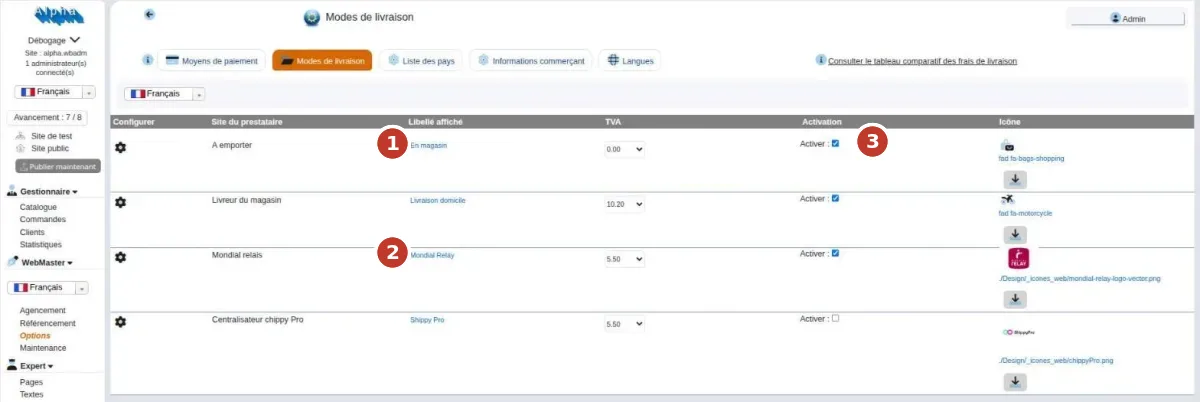
For fragile or heavy items (ceramics, glass, wood), pickup at the workshop avoids shipping costs and brings customers to your door. Add relay points for small parcels and Colissimo home delivery for more valuable shipments. Weigh a small and a large packed parcel, and check that the shipping fees shown actually cover the packaging.
Step 6: fill in the mandatory pages (30 minutes)
A store that sells online in the European Union must display:
- a legal notice: your name or company name, address, business registration number, the hosting provider;
- terms and conditions of sale: prices, delivery times, returns, guarantees;
- the 14-day right of withdrawal: customers can return a product without giving a reason. It does not apply to items made to the customer’s specifications or clearly personalized: say so in your terms for your custom work;
- a privacy policy and a cookie choice.
Your store’s terms of sale are already prepared, filled in from your merchant details: read them through and complete them.
Step 7: test, then publish (15 minutes)
Place a test order from start to finish: add to cart, payment in test mode, confirmation e-mail, invoice. Look at your store on a phone too: most visitors will come from one. Everything works? Publish: your store is live, and your subscription only starts with your first order.
Step 8: handle your first order
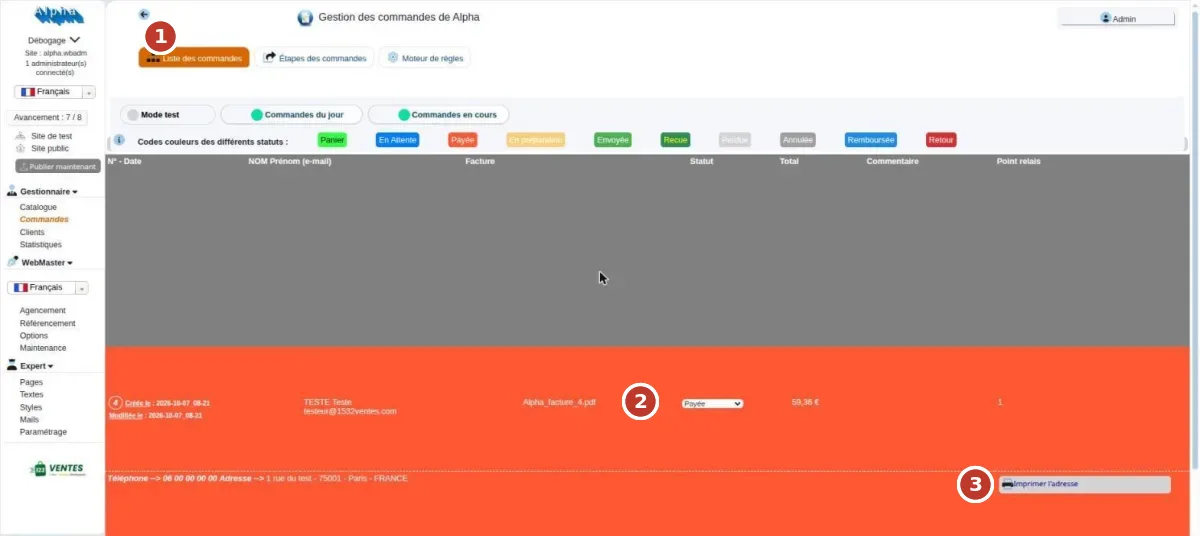
Each order arrives by e-mail and in the dashboard. Set it to “being prepared”, pack it, print the address, then mark it “shipped”: the customer is notified by e-mail. Slip a card with your store’s address into the parcel: the next order will come straight to you.
What does a craft online store really cost? A potter’s example
Take a potter who sells 40 pieces a year online, at €45 on average: €1,800 in sales.
| Item | Cost over one year |
|---|---|
| 123Ventes subscription (annual plan) | €319.90 |
| Card payment fees (Stripe standard rate for a European card: 1.5% + €0.25 per payment) | ≈ €37 |
| Custom domain name (optional) | €17 |
| Platform commission on sales | €0 |
| Total | ≈ €374 |
Shipping is paid by the customer and is not included here. The key point: the cost does not grow with your sales. If the potter sells twice as much, only the payment fees go up; the subscription stays the same. On a marketplace like Etsy, it is the opposite: commissions follow every sale (see our Etsy comparison). Every cost item is detailed in how much an online store costs.
Mistakes to avoid
- Waiting until the whole catalog is ready: open with 10 to 20 well-presented products.
- Dark photos or busy backgrounds: photos are what sells.
- Underestimated shipping costs: packing ceramics costs more than you think.
- Forgetting pieces sold at markets: set the stock back to 0 as soon as you sell a piece elsewhere.
- Not talking about your store: put the link on your social media, cards, labels and Google listing.
Your craft, step by step
Every craft has its own needs: one-of-a-kind pieces, perishable products, sizes, personalization. Our trade pages detail the settings for potters and ceramicists, soap makers, jewelry designers, sewing and textiles, woodworkers and delicatessens.
Support: you are never on your own
A question about a setting, unsure about a step? Support is included in the subscription, by e-mail and by phone. Would you rather have it done for you? We can set up your store and enter your catalog, or train you by the hour.
Frequently asked questions
How long does it take to build an online store for a craft business?
Creating the store takes about 2 minutes. Then allow one day for the look, around ten products, payments, shipping and the legal pages.
Do I need a registered business to sell my creations online?
Yes, as soon as you sell regularly. In France, the micro-entreprise is the simplest status to start with. Your registration number appears in the store’s legal notice.
How much does an online store cost for a potter or a maker?
With 123Ventes, €319.90 a year all-inclusive, with no commission, plus the payment provider’s fees (about €37 for 40 sales at €45) and, if you wish, a domain name at €17 a year.
How do I sell a one-of-a-kind piece without selling it twice?
Set its stock to 1: it leaves the shop with the first order. If you sell it at a market, set its stock back to 0 in the dashboard.
Does the right of withdrawal apply to made-to-order pieces?
No: items made to the customer’s specifications or clearly personalized are excluded. For your other products, customers have 14 days to withdraw.
I’m not comfortable with computers. Is this for me?
Yes. If you can send an e-mail with a photo, you can add a product. And support is there if you get stuck.
Can someone build my store for me?
Yes. We can set up your store for you (€400) and enter your catalog.
Create my shop