Designing an online shop: 8 steps from idea to your first sale
Published on 7 min read The 123Ventes team
Opening an online shop is not primarily a technical job. Today’s tools take care of hosting, payment and display on phones. What makes the difference is the design: what you sell, how you present it, and the path the customer follows to the order.
Here are the eight steps in designing an online shop, in the order in which they are easiest to do. Each one takes a few hours. At the end, you have a shop that is ready to sell, not an empty shop window.
1. Decide what you sell, and to whom
Before choosing colours, answer three questions in writing:
- What do you sell? Not your whole workshop: the pieces that sell well, ship easily and that you can make again.
- To whom? A customer buying a gift is not looking for the same thing as one buying for themselves. Describe them in one sentence.
- Why from you? Handmade, the material, the region, made to measure, advice: this is the sentence that goes at the top of your home page.
Start small: twenty well-presented products sell better than two hundred half-finished product pages. You can add the rest over the following weeks.
2. Organise the catalogue
The catalogue is the shelving of your shop. Customers should be able to find a product in two clicks.
- Few categories, using your customers’ words: “Bowls and plates” rather than “Tableware, stoneware collection”.
- Variants rather than duplicates: a single page for a jumper, with its sizes and colours, and stock for each one.
- Properly calculated prices, including materials, time and costs. Our method is explained in pricing your handmade creations.
If your products are already in a spreadsheet, keep it: most tools can import an Excel or CSV file, which saves you typing everything in by hand.
3. Prepare photos and product pages
Online, customers can neither touch nor try. Photos and text do all the work.
- Three to five photos per product: an overall view on a light background, a close-up of the material, the product in use, and a photo that shows its size.
- A clear title, with the words customers type into Google: “Handmade blue glazed stoneware bowl” rather than “Ocean”.
- A description that answers questions: dimensions, material, care, making time. The questions people ask you at the market are exactly the ones to cover here.
A smartphone and a window are enough for good photos: everything is explained in photographing your creations with a smartphone.
4. Choose payment and delivery
This is the step where most sales are lost: a customer who cannot find their payment method, or who discovers high shipping costs at the last moment, abandons their basket.
- Payment: card payment is essential, PayPal reassures some customers, and bank transfer helps with large orders. Compare each provider’s fees: they are taken from every sale.
- Delivery: choose one or two carriers suited to your parcels, add collection if you have a workshop or a stall, and show shipping costs from the product page onwards.
- Fragile items need suitable packaging and insurance: see shipping fragile items without breakage.
5. Write the mandatory pages
A shop that sells to consumers must display a few pages, easy to reach from every page of the site:
- The legal notice: who you are, how to contact you, your registration number and the site’s host.
- The terms and conditions of sale: prices, delivery, payment, the 14-day right of withdrawal, guarantees, the consumer mediator.
- The privacy policy: what data you collect about your customers and what you do with it.
These are short texts, but they protect you as much as your customers. The details, including the exceptions for made-to-measure creations, are in selling your creations online: what the law says. The rules described there are those that apply in France.
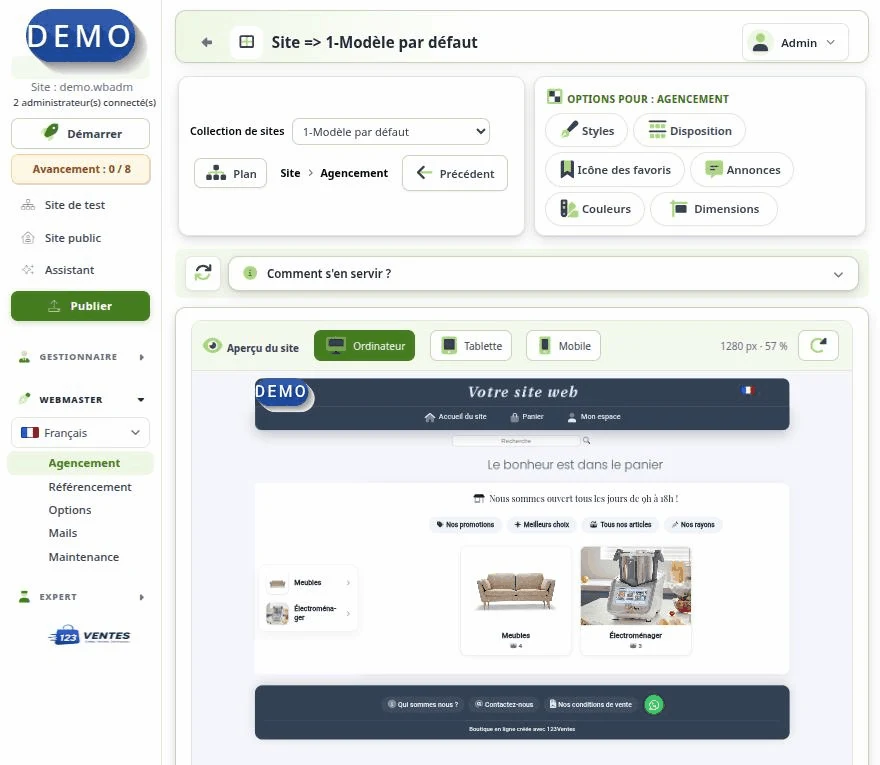
6. Design the layout and look of the shop
Layout comes sixth, and that is no accident: it is much easier to choose the decor when you know what will go in it.
- The home page says in one sentence what you sell, shows your best products and leads to the catalogue in one click.
- Two or three colours, those of your logo or packaging, and a single font for the text.
- Phone first: most of your customers will look at your shop on their phone. Check every page on yours.
- An “About us” page with a photo of you and of the workshop: for a maker, it is often the most-read page after the home page.
7. Test an order from start to finish
Before opening, place an order yourself, as a customer, on your phone and then on a computer:
- find a product from the home page, then with the search;
- add it to the basket, choose a delivery option, and check the shipping cost;
- pay in test mode, with no real charge;
- check the confirmation e-mail received by the customer and the alert you receive;
- ask someone close to you to do the same without your help, and note where they hesitate.
Every hesitation is a sale lost on opening day. Fix them before you launch the shop.
8. Launch the shop and make it known
An online shop does not get found on its own. In the first few weeks:
- Tell your existing customers: an e-mail, a message, a card in every parcel or every bag at the market.
- Create your Google Business Profile if you have a workshop or a physical shop, with a link to your site.
- Post on a single social network, the one where your customers are, rather than half-heartedly on all of them. See social networks for makers.
- Look after the SEO of your product pages and other pages: the basics are in SEO for an online shop: a beginner’s guide.
What about 123Ventes?
With 123Ventes, you design your online shop without writing code, and part of the work is already done:
- the catalogue takes an unlimited number of items, with variants and stock, and can be imported from an Excel or CSV file;
- payment (Stripe or PayPlug for cards, PayPal, bank transfer) and delivery are preconfigured: you enter your accounts and your rates, and each payment method can run in test mode;
- a template for the terms and conditions of sale is provided, ready to adapt;
- the layout is set while you watch the result live, and customisation goes as far as colours and fonts.
Would you rather hand over the design? With the turnkey online shop, we build it for you, catalogue included, in about a week, for a one-off €400.
Free sign-up, no bank card needed. The €29.90 monthly subscription, with no commission, is only requested when you receive your first order.
Frequently asked questions
How long does it take to design an online shop?
Allow from a few days to a few weeks, depending on the number of products and the state of your photos. The technical part only takes a few hours with an online platform: preparing the catalogue, photos and texts is what takes the most time.
Do you need to know how to code to design your online shop?
No. Online platforms take care of hosting, payment and display on phones. You work on the content: products, photos, texts and layout.
Where should you start when designing an online shop?
With what you sell and to whom, then with the catalogue. The layout comes next: it is easier to choose the decor when you know what will go in it.
How much does it cost to design an online shop?
If you do it yourself on a platform, it only costs the subscription and your time. If you hand it over to a provider, it ranges from a few hundred euros for a turnkey shop to several thousand for a custom-built site. The details are in our article on creating an e-commerce website.
Which pages are mandatory on an online shop?
In France: the legal notice, the terms and conditions of sale and the privacy policy, accessible from every page of the site.
Conclusion
Designing an online shop well means taking the steps in order: knowing what you sell, organising the catalogue, taking care over photos and product pages, setting up payment and delivery, writing the mandatory pages, and only then the layout, before testing and launching. Each step makes the next one easier.
To go further, see the three ways to create an e-commerce website, the budget for opening an online shop, and the online shop for makers.
👉 Try 123Ventes for free: €29.90 a month, with no commission on your sales.